If you’re looking for the single most effective way to increase your website’s conversion rate, social proof is it.
Not better copywriting. Not prettier design. Not more traffic. Social proof—when implemented strategically—is the biggest conversion driver you have available. It’s the difference between a visitor thinking “this looks interesting” and actually clicking that buy button or filling out that contact form.
But here’s the problem: most websites use social proof poorly. They centralize all their testimonials on one dedicated page that nobody visits. They use generic, vague reviews that don’t answer real objections. They add social proof as an afterthought rather than building it into their conversion strategy. Or they don’t use it at all, leaving visitors to make purchasing decisions in a vacuum with nothing but their own uncertainty to guide them.
The result? Lower conversion rates, higher bounce rates, and missed revenue that could have been captured with smarter social proof placement.

When you understand how social proof actually works—not just what it is, but where to place it, which types to use, and how to match it to specific trust gaps—your conversion rate improves dramatically. We’re talking about the kind of improvements that Casey Smith saw when she added strategic popups and generated a $120+ sale within 20 minutes. Or the $47,000 in revenue Krista Jones generated in six months from a single well-placed popup.
This guide will show you exactly how to use social proof on your website in a way that actually increases conversions—without being manipulative, aggressive, or annoying. You’ll learn which types of social proof work best for different situations, where to place them strategically, and how to implement them without needing a developer.
Table of Contents
What Is Social Proof for Websites (And Why It Actually Works)
Social proof is external validation that shows others trust and use your product or service. It’s the digital equivalent of seeing a restaurant packed with diners and thinking, “That place must be good.”
But here’s what makes social proof particularly powerful for websites: it bridges what I call the trust gap. The trust gap is the distance between “I’ve heard of you” and “I’m ready to buy from you.” It’s that moment of hesitation where someone thinks your offer sounds good but isn’t quite convinced it’ll work for them.
Every prospect visiting your website is asking themselves one critical question: “Can this really work for someone like me?”
Social proof answers that question. It shows them that yes, people like them—facing similar problems, in similar situations—have gotten real results. When done right, it removes that final layer of doubt and makes the decision to purchase feel safer and smarter.
The psychology behind this comes from Robert Cialdini’s principle of consensus: when we’re uncertain about a decision, we look to what others are doing to guide our own behavior. This isn’t manipulation—it’s just how humans naturally make decisions. Social proof taps into that fundamental instinct and uses it to build trust rather than create doubt.
The Types of Social Proof for Your Website
Not all social proof is created equal. Different types serve different purposes and close different trust gaps. Here are the main types you can use on your website:
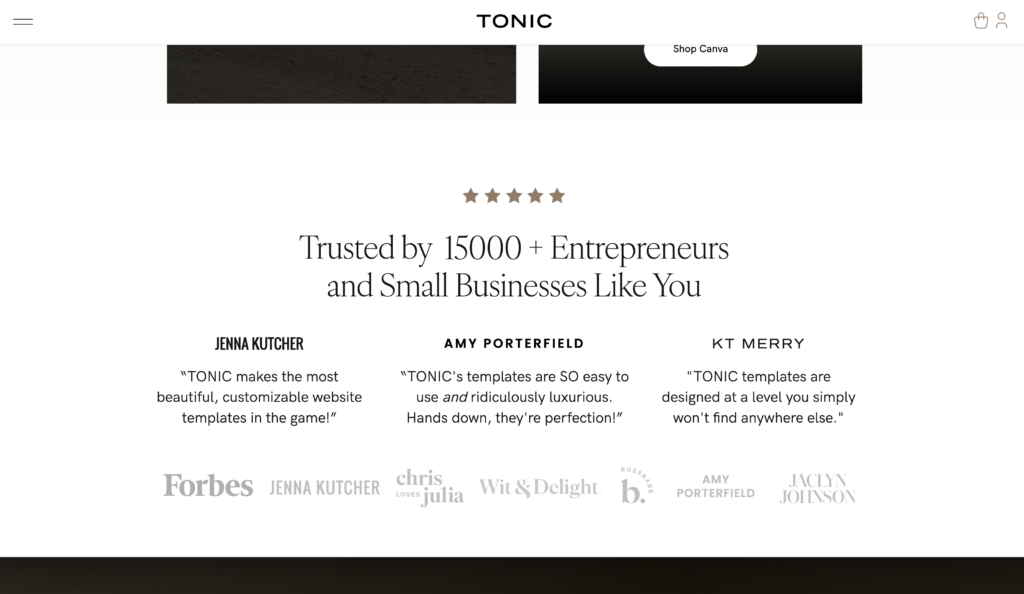
Customer Testimonials and Reviews
What it is: Written or video feedback from real customers about their experience with your product or service.
What trust gap it closes: “Will this actually work?” and “What’s it really like to work with this company?”
This is bite-sized social proof that’s easy for people to digest. Testimonials work in the background of your visitor’s decision-making process, quietly building confidence without requiring deep engagement. Someone can scan a quick testimonial in seconds and absorb enough information to shift their perception from skeptical to curious.
The key is specificity. Generic praise like “Great service!” doesn’t build trust. But a testimonial that says “I was nervous about launching my first website, but the template setup took me 45 minutes and I had zero technical issues” answers real objections.
Case Studies and Success Stories
What it is: Detailed accounts of how specific customers achieved specific results using your product or service.
What trust gap it closes: “Can I get measurable results?” and “What does success actually look like?”
Case studies are the next level up from customer testimonials and reviews. Where testimonials give you quick, digestible proof, case studies provide the full story—the challenge, the solution, the process, and the measurable outcome. They work particularly well for high-ticket items or B2B services where buyers need more than just reassurance—they need proof of ROI and a clear picture of what working with you actually looks like.
User Statistics and Counts
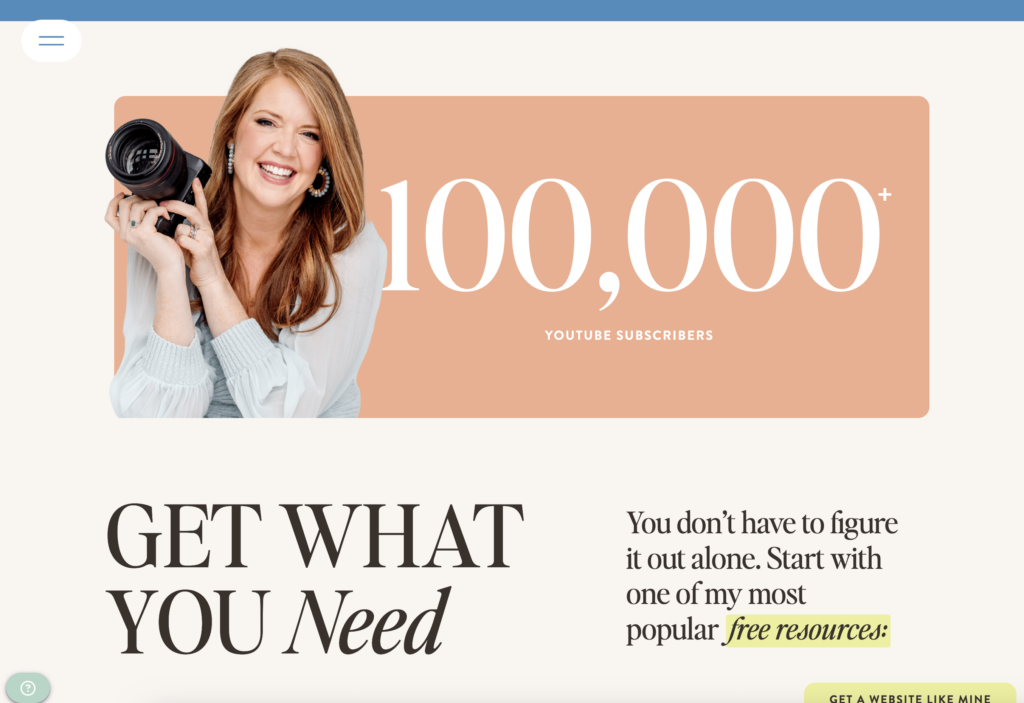
What it is: Numbers that demonstrate scale and popularity, like “Join 10,000+ creative entrepreneurs” or “Over 50,000 templates sold.”
What trust gap it closes: “Is this established?” and “Am I taking a risk on something unproven?”
These work best when the numbers are genuinely impressive and relevant to your audience. Fifty users might be impressive for a niche B2B tool but not for a consumer product.
Real-Time Activity Notifications
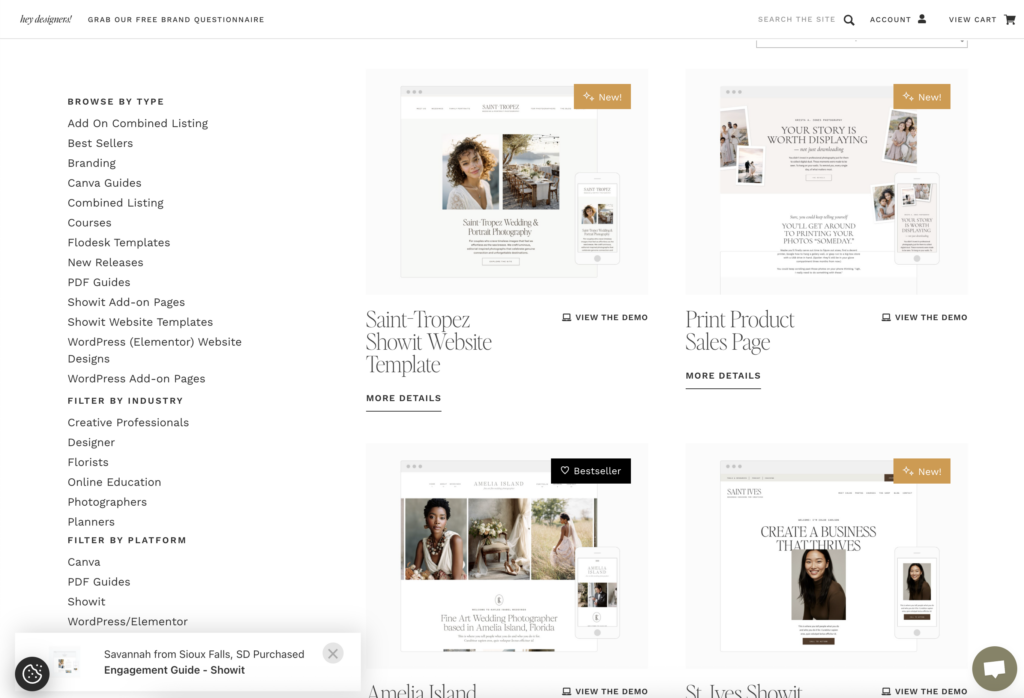
What it is: Pop-up notifications showing recent customer actions, like “Sarah from Portland just purchased the Anya Template” or “3 people signed up in the last hour.”
What trust gap it closes: “Is anyone actually buying this?” and “Am I the only one interested?”
This is one of the most effective forms of social proof because it shows your site is active right now. It removes the fear of being first or feeling like you’re looking at an abandoned storefront.
Client Logos and Brand Names
What it is: Visual display of well-known companies or brands you’ve worked with.
What trust gap it closes: “Are they credible?” and “Do serious businesses trust them?”
This works particularly well for B2B companies, agencies, and service providers. If someone recognizes even one logo, it instantly elevates your credibility.
Expert Endorsements and Certifications
What it is: Recommendations from industry authorities or official certifications that validate your expertise.
What trust gap it closes: “Do experts trust this?” and “Are they qualified?”
Think “Featured in Forbes,” “Certified Shopify Partner,” or “Recommended by [Industry Leader].” These work because they borrow credibility from established authorities.
Media Mentions and Press
What it is: Logos or quotes from publications that have featured your work.
What trust gap it closes: “Is this legitimate?” and “Has anyone vetted this?”
Even mentions in smaller industry publications can build trust—sometimes more effectively than big-name publications. A mention in a niche publication that your ideal customer actually reads and respects can carry more weight than a feature in a major outlet they’ve never heard of. If you’re targeting wedding photographers, a feature in a respected photography blog matters more than a generic business mention in a large publication. The key is relevance to your audience, not just publication size.
Social Media Proof
What it is: Follower counts, engagement metrics, or embedded social feeds showing your active community.
What trust gap it closes: “Do other people follow them?” and “Are they active and responsive?”
This works best when your social following is genuinely engaged. A feed full of unanswered comments does more harm than good.
User-Generated Content
What it is: Photos, videos, or reviews created by your customers showing them using your product.
What trust gap it closes: “What does this look like in real life?” and “Are real people actually using this?”
This is particularly powerful for physical products or templates where seeing something “in the wild” helps buyers visualize ownership.
Awards and Recognition
What it is: Industry awards, “best of” lists, or official recognition from credible sources.
What trust gap it closes: “Is this top-tier?” and “Have they been independently evaluated?”
These work best when the award is from a recognized authority in your industry. Made-up awards from fake organizations do the opposite of building trust.
Before/After Transformations
What it is: Visual or narrative demonstrations of the change your product or service creates.
What trust gap it closes: “What kind of results can I expect?” and “Is the improvement dramatic enough to justify the investment?”
This is especially powerful for design services, coaching, courses, or any offering where transformation is the product.
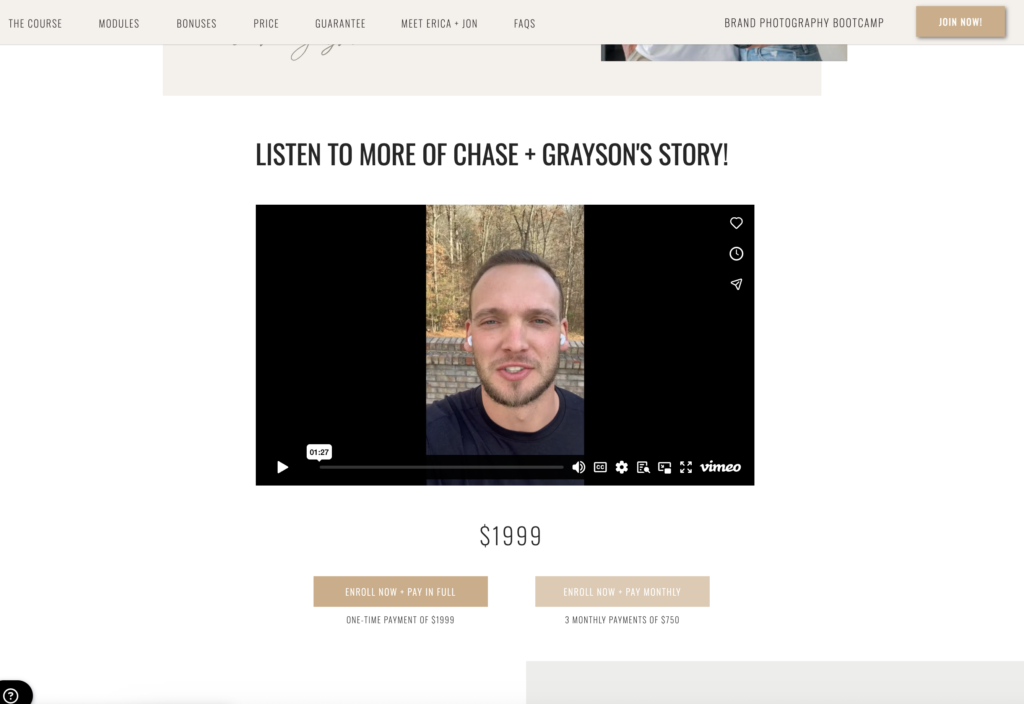
Video Testimonials
What it is: Recorded testimonials where real customers speak directly to camera about their experience.
What trust gap it closes: “Are these testimonials real?” and “What do actual customers really think?”
Video is harder to fake than text, which automatically increases trust. Even simple smartphone videos from happy customers outperform polished written testimonials.
For a deeper dive into each type with specific examples, check out our complete guide to social proof types.
Choosing the Right Social Proof: Understanding Your Trust Gap
Here’s the framework that matters: you don’t choose social proof based on what you have available. You choose it based on the specific trust gap you need to close.
Every claim you make on your website creates a potential trust gap. Someone reading your homepage might believe your templates are “easy to use,” but they’re still wondering, “Yeah, but will they be easy for me to use?” That’s the gap.
Bridging the trust gap effectively means intimately knowing your ideal customer profile. You need to be deeply familiar with their wants, needs, desires, problems, challenges, and emotional state. When you understand what keeps them up at night, what makes them hesitate before purchasing, and what objections run through their mind as they browse your site, you can select social proof that speaks directly to those specific concerns.
Your job is to identify those gaps and strategically place the right type of social proof to bridge them.
How to Identify Your Trust Gaps
Start by auditing your website with fresh eyes. Look at each page and ask:
What claims am I making here? Every headline, every feature description, every benefit you list is a claim that requires proof.
What objections might someone have? Put yourself in the mind of a skeptical visitor. What would make them hesitate? What would they question?
What proof would close that gap? Once you know the objection, you can choose the right type of social proof to address it.
Practical Examples of Trust Gap Mapping
Claim: “Our templates are beginner-friendly”
Trust gap: “But I have zero design experience”
Social proof solution: Testimonial from a customer who explicitly mentions being a beginner: “I’d never built a website before, and I had my site live in three hours.”
Claim: “We help photographers book more clients”
Trust gap: “But my market is different than other photographers”
Social proof solution: Case study from a photographer in a specific niche showing exact booking increases: “As a newborn photographer in suburban Ohio, I went from 8 to 23 bookings per month in 90 days.”
Claim: “Setup takes less than 10 minutes”
Trust gap: “That sounds too good to be true”
Social proof solution: Real-time notifications showing actual people completing setup, or a video testimonial walking through the process in real time.
Claim: “Trusted by top creative businesses”
Trust gap: “Who specifically?”
Social proof solution: Client logos of recognizable brands in the creative industry.
Claim: “Our course will teach you to rank on page one of Google”
Trust gap: “Can you actually deliver those results?”
Social proof solution: Multiple before/after case studies showing specific ranking improvements with screenshots and date stamps.
The key insight here: generic social proof closes generic trust gaps. Specific social proof closes specific trust gaps. The more precisely you can match the proof to the objection, the more effective it becomes.
This is why that dedicated testimonials page isn’t working. You’re making someone scroll through 30 testimonials hoping they find one that addresses their specific concern. Strategic placement means you’re answering their question right when they’re asking it.
Where to Place Social Proof on Your Website
Social proof should appear everywhere you make a claim. Not just on one page. Not just in your footer. Everywhere.
Here’s how to think about strategic placement across your entire site:
Homepage: Building Immediate Credibility
Your homepage is often the first impression. You need to establish trust within seconds, before someone decides whether to keep exploring.
Above the fold: Include a quick credibility indicator near your main headline. This could be user counts (“Join 10,000+ entrepreneurs”), client logos (if impressive), or a brief stat (“50,000 templates sold”).
Near your value proposition: Right after you make your main claim about what you do and who it’s for, include a testimonial that validates that exact claim. If your headline says “Website templates for creative entrepreneurs,” your testimonial should be from a creative entrepreneur.
Throughout each section: As you scroll down and introduce different benefits or features, match each with relevant proof. Feature about “easy customization”? Show a testimonial about how easy it was to customize. Section about customer support? Include feedback specifically about your support.
Product and Service Pages: Removing Purchase Friction
These pages are where buying decisions happen. Your social proof here needs to be laser-focused on the specific offering.
Near the product headline: Start strong with proof that this specific product/service delivers results.
In feature sections: Every feature you highlight should have corresponding proof. Don’t just say “mobile-responsive design”—show a testimonial from someone who mentions their mobile site performance improved.
Near pricing: This is where hesitation peaks. Place your strongest conversion-focused testimonials here—ones that mention ROI, value for money, or results that justified the investment.
Near the add-to-cart button: Consider a final trust signal right before purchase. This could be a guarantee, a recent purchase notification, or a quick testimonial about the buying experience itself.
About Page: Establishing Authority
Your About page is where people come when they want to know if you’re legit. Give them what they’re looking for.
Credentials and certifications: Display relevant industry certifications, partnerships, or official recognitions.
Media mentions: If you’ve been featured anywhere, show it here. Even podcast appearances or guest blog posts count.
Awards or recognition: Industry awards, “Best of” lists, or community recognition all belong here.
Client logos: If you work with notable clients, this is the place to showcase that.
The About page isn’t about bragging—it’s about removing the “Can I trust these people?” question so visitors can focus on whether your offer is right for them.
Landing Pages: Matching Proof to the Goal
Landing pages typically have one clear conversion goal, which means your social proof should be hyper-relevant to that specific action.
If it’s a lead magnet landing page, show testimonials about the value of the free resource or stats about how many people have downloaded it.
If it’s a sales page for a specific product, every piece of social proof should relate directly to that product and the transformation it offers.
If it’s a webinar signup page, include feedback from past attendees about what they learned.
The more singular your call-to-action, the more focused your social proof should be.
Throughout Your Site: Dynamic Social Proof
Here’s where real-time activity notifications come in. These shouldn’t be confined to one page—they should appear throughout your site to create a sense of active engagement.
Real-time notifications like “Jessica from Austin just purchased the Hudson Template” or “12 people are viewing this page” work because they:
- Remove the “am I the first?” fear
- Show your business is actively serving customers right now
- Create subtle urgency without being aggressive
- Provide context that this is a normal, safe decision others are making
The key is authenticity. If you’re showing activity notifications, they should reflect actual activity. Tools like BDOW! make it easy to display genuine real-time actions without fabricating data.
One BDOW! user, Ingrid Urena from Penguin Designing, shared that her beta students “actually told me they felt the FOMO, thinking it could be someone signing up for the pre-launch of an upcoming course… and guess what? It totally worked. The beta spots sold out in a single day!”
That’s social proof working exactly as it should—by showing genuine activity that makes potential customers feel confident about taking action.
The Principle That Ties It All Together
Don’t centralize social proof on one page. Distribute it where trust gaps exist.
Every time you ask someone to believe something, show them proof that it’s true. Every time you ask someone to take an action, show them that others have taken that action and benefited from it.
That’s the shift that changes everything.
How to Add Social Proof to Your Website
Now let’s get into the actual implementation. How do you take all this strategy and turn it into something live on your site?
Adding Static Social Proof
Static social proof includes testimonials, case studies, client logos, and other elements that don’t change in real-time. Here’s how to add them effectively:
Collecting testimonials that actually convert:
Stop asking for generic feedback. Instead, ask specific questions that elicit the details you need:
- What was your situation before using our product/service?
- What specific results did you see?
- What was your biggest hesitation before purchasing?
- Who would you recommend this to?
These questions generate testimonials with the specific, relatable details that close trust gaps.
Formatting for maximum impact:
Include the person’s full name (first and last builds more trust than first name only), their role or business name if relevant, and ideally a photo. If you can get video testimonials, even better—they’re significantly harder to fake and therefore more credible.
Placement strategy:
Don’t just dump all testimonials in one section. Break them up and place them near the specific claims they validate. Create testimonial snippets you can reuse throughout your site, each matched to a particular feature or benefit.
Technical implementation:
Most website builders have testimonial modules built in. For WordPress, Squarespace, Showit, or Shopify, you can typically add testimonials through native features or simple plugins. If you’re using custom code, a simple HTML structure with proper styling will work fine.
The goal isn’t complex—it’s strategic placement.

Adding Dynamic Social Proof Notifications
This is where things get more interesting. Dynamic social proof shows real-time activity on your site, and it’s one of the most effective forms of social proof you can implement.
What makes notifications effective:
Real-time activity notifications work because they answer a question most visitors have but don’t voice: “Is anyone actually buying this?” When someone sees “Sarah from Portland just purchased the Anya Template,” it removes doubt. It shows the site is active, people are making decisions, and transactions are happening.
But here’s what’s critical: the notifications need to be real.
Types of activity worth showcasing:
- Recent purchases (“Amanda just purchased the Clarity Template”)
- New signups (“3 people joined our email list in the last hour”)
- Downloads (“Mark from Seattle just downloaded the pricing guide”)
- Current viewers (“8 people are currently viewing this page”)
The key is relevance. Only show activity that reinforces the action you want visitors to take on that specific page.
Best practices for social proof notifications:
Keep the frequency reasonable. Notifications every 5-10 seconds feel genuine. Notifications appearing too quickly—every few seconds—feel fabricated. Find the balance that matches your actual traffic and activity levels.
Make them subtle, not aggressive. A small notification that slides in from the corner and disappears after a few seconds is perfect. A full-screen takeover that blocks content is not.
Use real data only. This cannot be emphasized enough. If you’re showing “Sarah from Portland just purchased,” Sarah from Portland should have actually just purchased. The moment visitors discover your notifications are fake, you’ve destroyed more trust than you could ever build.
Respect privacy. Show first names and cities, not full names and addresses. People should feel comfortable having their activity displayed in this general way.
Setting up notifications with BDOW!:
This is exactly what BDOW!’s social proof feature was built for. You can show real-time activity from your site without any coding required.
The setup process is straightforward: connect your data source (your e-commerce platform, email service, or form submissions), choose which activities to display, customize the notification design to match your brand, and set display rules for when and where notifications appear.
Tools like BDOW! handle all the technical complexity while giving you complete creative control over how notifications look and behave. You’re not stuck with generic templates—you can make them look like they were custom-built for your brand.
For a detailed walkthrough of setting up social proof campaigns, check out our complete guide to building a social proof campaign.
Common Social Proof Mistakes (And How to Avoid Them)
Even with the best intentions, it’s easy to implement social proof in ways that hurt more than help. Here are the mistakes I see most often:
Mistake #1: Relegating All Social Proof to One Dedicated Page
This is the most common mistake, and it’s the one we started this article with.
Why it fails: Your testimonials page might be beautiful, but most visitors never see it. They’re making decisions on your homepage, your product pages, your pricing page. If all your social proof lives somewhere else, it’s not closing trust gaps where they actually exist.
How to fix it: Distribute social proof throughout your entire site. Every page should have relevant proof that addresses the specific claims or objections on that page. Think of your testimonials page as an archive, not your primary strategy.
Mistake #2: Fake or Inflated Numbers
This includes fabricated “people are viewing this” numbers, made-up testimonials, or inflated user counts.
Why it fails: It destroys trust the moment someone discovers it’s fake. And they will discover it. People are more savvy than you think. If you claim “10,000 users” but your site has clear signs of being brand new, people notice.
How to fix it: Only display real, verifiable data. If you’re displaying user counts, they should be accurate. If you’re showing testimonials, they should be from real customers who actually said those words.
Your reputation is worth infinitely more than any short-term conversion boost from fabricated social proof.
Mistake #3: Generic, Vague Testimonials
“Great service!” “Highly recommend!” “Love this product!”
Why it fails: These don’t answer any actual questions or address any real objections. They’re so generic they could apply to literally any business. Prospects read them and think, “Okay, but what does that actually mean for me?”
How to fix it: Collect and display specific testimonials with measurable results and relatable details. Instead of “Great templates!” you want “I’m not technical at all, and I had my photography website live in 90 minutes using the Anya template. I’ve booked three weddings directly from my site in the first month.”
See the difference? The second version tells someone exactly what to expect and who it worked for.
When collecting testimonials, ask questions that prompt specificity: What was your situation before? What specific results did you see? What was your biggest hesitation? The answers to these questions become your most powerful social proof.
Mistake #4: Aggressive or Overwhelming Notifications
Pop-ups that appear instantly when someone lands on your site. Notifications every 15 seconds. Full-screen overlays that block content. Multiple notifications stacking on top of each other.
Why it fails: It creates skepticism instead of trust. When notifications are too frequent or too aggressive, people start questioning whether they’re real. It also creates a poor user experience, which damages your brand more than the social proof helps.
How to fix it: Use real data with reasonable frequency and subtle design. A notification every 5-10 seconds feels natural if you have the traffic to support it. Design notifications that slide in subtly, display for a few seconds, and disappear without requiring interaction. Respect for the user experience is what makes social proof effective rather than annoying.
Mistake #5: Outdated or Irrelevant Social Proof
Testimonials from 2018. Case studies about products you no longer offer. Client logos from companies you worked with once five years ago. Social media follower counts that haven’t been updated in months.
Why it fails: It suggests you’re not currently successful. If all your social proof is old, visitors wonder, “Are they still in business? Are people still buying from them?” It raises more questions than it answers.
How to fix it: Regular updates and relevance filtering. Set a calendar reminder to refresh your social proof quarterly. Remove or update anything more than 18-24 months old unless it’s particularly impressive or relevant. Make sure the social proof on each page relates to what that page is about.
For real-time notifications, this is automatic—they’re always current because they’re pulling from actual recent activity.
Real Examples of Social Proof That Converts
Let’s look at some concrete examples of social proof implementation that generated real results.
Case Study: The $47,000 Popup
Krista Jones, a Showit Design Partner, created a flash sale popup for Davey & Krista that generated $47,000 in six months. The setup took 23 minutes.
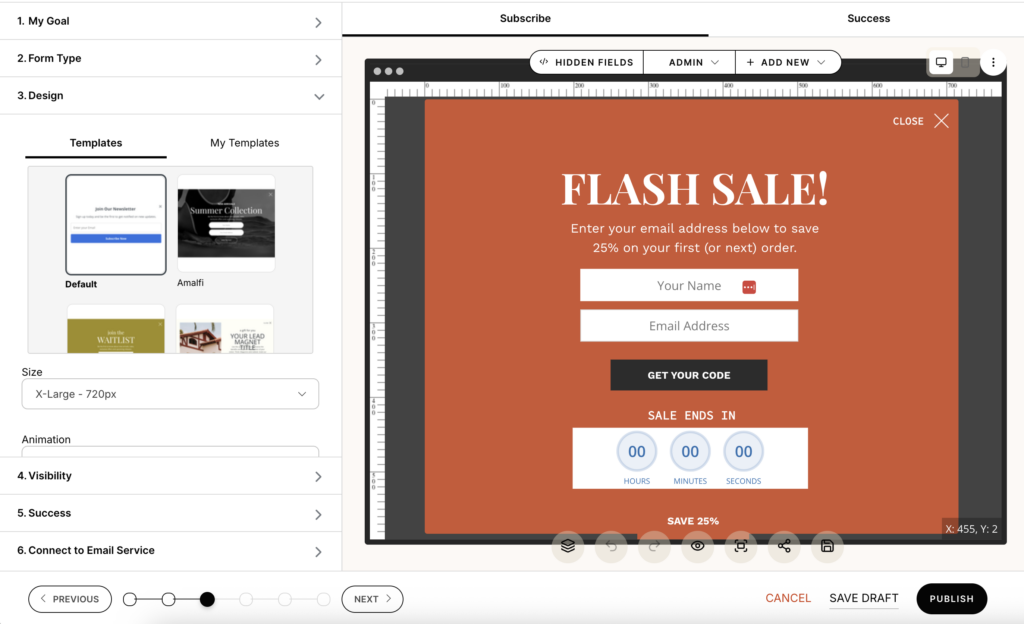
Here’s what made it work:
Clear, honest communication: The popup said exactly what it was: “FLASH SALE! Enter your email address below to save 20% on your first (or next) order.” No tricks, no vague promises.
Real urgency: The countdown timer showed the actual time remaining in the flash sale. When it hit zero, the sale ended. No extensions. No “we heard you wanted more time” backpedaling.
Strategic timing: The popup appeared after 5 seconds on the site, giving visitors time to orient themselves. Testing showed immediate display had 23% lower email capture rates.
Respect for the visitor: Prominent close button, one appearance per sale period, no showing it to people who already opted in.
The social proof element? The popup itself showed that others were taking advantage of the sale, and the countdown timer created legitimate urgency based on real scarcity.
The conversion rate: 36.6% of people who saw the popup opted in. Those subscribers converted at 3.2x the rate of regular opt-in subscribers because they came with buying intent.
The lesson: Social proof works best when it’s wrapped in genuine value and honest communication. The popup didn’t trick anyone into buying—it offered real value during a real promotional event.
Example: Exit Intent That Delivered Immediate Results
Casey Smith from Sugar Studios Design implemented an exit-intent popup with a promo code using BDOW!. Within 20 minutes, she had a $120+ order.
She shared: “Within 20 minutes of adding an exit intent popup with a promo code, I had a $120+ order. I’m so glad it’s actually working—the BDOW! popups are the nicest ones I’ve ever used. I’ve had a boost in sales since I added the popups.”
What made it effective: The popup appeared at exactly the right moment—when someone was about to leave. It offered genuine value (a discount code) in exchange for an email address. And critically, it used BDOW!’s customization features to match her brand perfectly, which built trust rather than looking like a generic template slapped on the site.
The lesson: Timing and relevance matter as much as the social proof itself. An exit-intent offer catches people at a decision point and gives them a reason to reconsider.
Example: Social Proof That Sold Out a Beta Launch
Ingrid Urena from Penguin Designing used BDOW!’s social proof pop-ups during a beta launch. Her students told her they “felt the FOMO, thinking it could be someone signing up for the pre-launch of an upcoming course.”
The result? Beta spots sold out in a single day.
What made it effective: The real-time notifications showed genuine activity—people were actually signing up. This created natural FOMO without any manipulation. Students saw others taking action and didn’t want to miss out.
The lesson: When social proof reflects real activity, it creates momentum. People want to be part of something that others are actively joining.
Example: Strategic Placement on Service Pages
Christina Laing from The Buffalo Collective used BDOW! during her Black Friday sale. She was able to “offer them our discount while still collecting their email, AND I was able to give them an extra little nudge before they clicked off my site. I captured so many more leads and customers than I would have otherwise.”
What made it effective: Multiple touchpoints of social proof throughout the buying journey. The discount offer (proving value), the email capture (building a relationship), and the exit-intent nudge (one last chance to convert).
The lesson: Don’t rely on a single instance of social proof. Strategic placement at multiple decision points compounds effectiveness.
For more detailed examples of social proof in action, check out our collection of social proof examples from real businesses.
Setting Up Social Proof with BDOW!
If you’re ready to implement dynamic social proof on your website, BDOW! makes it straightforward. Here’s what you need to know:
What BDOW! Offers for Social Proof
BDOW! specializes in making social proof implementation easy for creative entrepreneurs and small businesses. The platform includes:
Real-time activity notifications that show recent purchases, signups, downloads, or any other action you want to highlight. These pull from your actual data, so you’re never displaying fake activity.
Complete customization so notifications match your brand perfectly. Colors, fonts, positioning, timing—you control everything. As Lauren Rich from Lauren Rich Creative put it: “BDOW! makes it ridiculously easy to create popups that actually look and feel like my brand (no sad generic templates here).”
Advanced targeting options that let you control exactly when and where notifications appear. Show them to new visitors but not returning customers. Display them on specific pages. Set frequency caps to avoid overwhelming people.
Easy setup with no coding required. You don’t need a developer. The interface is designed for creatives who want powerful features without technical complexity.
Multiple notification types including recent activity, live visitor counts, conversion notifications, and custom messages. You choose which types work best for your business.
Quick Setup Overview
Here’s the basic process:
- Connect your data source: Link BDOW! to your e-commerce platform, email service provider, or form submissions so it can pull real activity data.
- Choose notification type and style: Select what kind of activity you want to display and customize the design to match your brand.
- Set display rules: Determine when notifications appear (timing after page load), where they appear (which pages), and how often (frequency caps).
- Customize messaging and design: Write the notification copy, choose colors and fonts, and position elements exactly where you want them.
- Test and launch: Preview how notifications look and behave, make any final adjustments, and turn them on.
The entire process typically takes 15-30 minutes, depending on how much customization you want to do.
For a complete walkthrough of setting up your first campaign, including screenshots and step-by-step instructions, visit our guide to building a social proof campaign.
To learn more about all of BDOW!’s social proof features and see examples, check out the BDOW! Social Proof feature page.
The Shift That Actually Matters
Here’s what I want you to take away from this guide:
Social proof isn’t about plastering testimonials everywhere and hoping something sticks. It’s not about aggressive popups or fake countdown timers or manufactured urgency.
It’s about understanding where trust gaps exist on your website and strategically placing the right kind of proof to bridge those gaps.
Every claim you make is an opportunity to build trust by showing that others have experienced what you’re promising. Every call-to-action is an opportunity to remove fear by showing that others have taken that action successfully.
The websites that convert best aren’t the ones with the most social proof. They’re the ones with the most strategically placed social proof—the right type, in the right location, addressing the right objection.
Your Next Steps
If you’re ready to improve how you use social proof on your website:
Start with an audit. Go through your site page by page. Identify every claim you’re making and every trust gap that might exist. Write them down.
Match proof to gaps. Look at the social proof you already have (testimonials, reviews, case studies, data) and map each piece to a specific trust gap. If you find gaps without matching proof, you know what to collect next.
Implement strategic placement. Stop thinking about social proof as something that lives in one place. Distribute it throughout your site, placing each piece where it’s most relevant.
Add dynamic social proof. If you’re not showing real-time activity, you’re missing one of the most effective forms of social proof. Tools like BDOW! make this easy to implement without technical expertise.
Test and refine. Pay attention to what works. Which testimonials seem to resonate most? Which pages convert better after adding social proof? Let the data guide your optimization.
Remember: you’re not trying to trick anyone. You’re trying to remove genuine uncertainty by showing genuine proof that what you offer actually works.
Do that consistently, and your conversion rates will take care of themselves.




Add A Comment
VIEW THE COMMENTS